JSONL (JSON Line) Files

Runtime masks fields in JSON Line files using Spark SQL expressions to locate, filter, and transform specific columns. This distributed SQL engine efficiently handles large-scale data, enabling conditional logic and complex transformations for flexible masking.

Important note on attribute ordering:
When processing JSONL files, the order of attributes in each JSON object cannot be guaranteed. Attributes are written out alphabetically. While this does not affect how data reading software interprets the file, it may appear unusual when inspecting the file manually.
Creating an Application
To configure an application, click the "Install Application" button. This will open a new page where you can either select an existing application or create one from scratch. Assuming this is your first file masking application, click the "Create a New Application" button to open the configuration page:
File Pattern
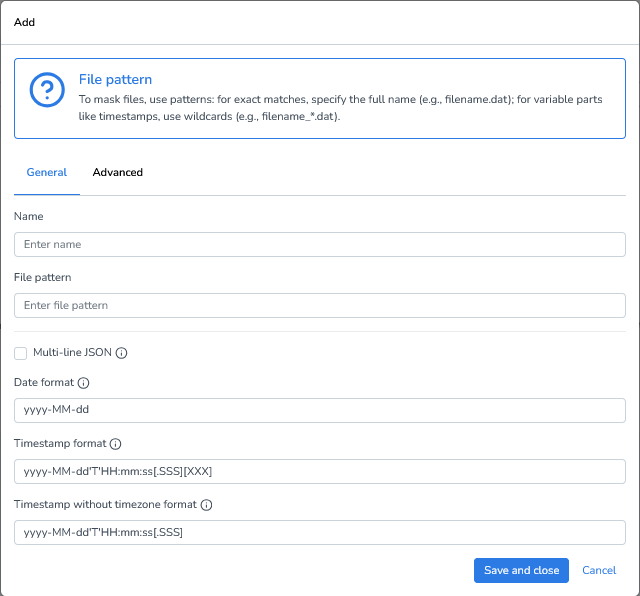
When working with JSONL (JSON Lines) files, you can configure the following options to ensure proper parsing and interpretation:
Exact file names: Use the full file name if it’s always the same.
Example: CUSTOMERS_10k.JSONLWildcard patterns: Use wildcards to match files with dynamic elements, such as timestamps, sequence numbers, or environment identifiers.
Example: CUSTOMERS_*.JSONLMulti-line JSON: Enable this if your JSON is formatted across multiple lines or represented as a JSON array. This is required for pretty-printed JSON files.
Date format: Defines how dates are parsed, using Spark datetime patterns. Default: yyyy-MM-dd
Timestamp format: Defines how timestamps with timezone information are parsed. Default: yyyy-MM-dd'T'HH:mm:ss[.SSS][XXX]
Timestamp without timezone format: Defines how timestamps without timezone information are parsed. Default: yyyy-MM-dd'T'HH:mm:ss[.SSS]
Advanced Settings
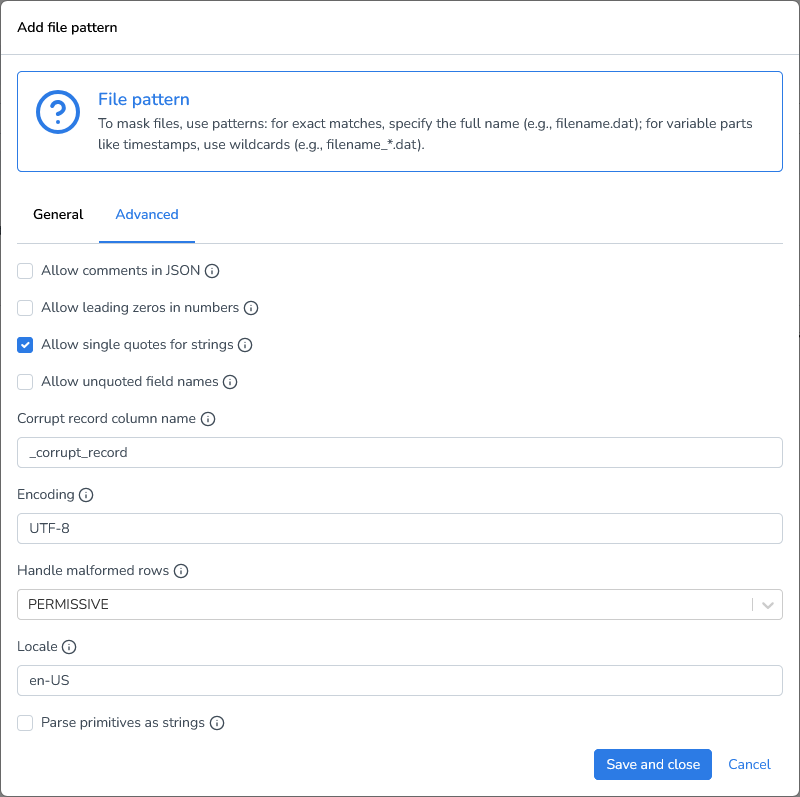
These advanced options provide greater flexibility when working with JSONL files, especially when handling non-standard JSON or malformed input:
Allow comments in JSON: Accept Java-style comments (e.g., //, /* ... */) inside JSON documents.
Allow leading zeros in numbers: Permits numbers with leading zeros (e.g., 00123). Note: not part of standard JSON.
Allow single quotes for strings: Accepts 'single-quoted' strings instead of the standard "double-quoted" strings.
Allow unquoted field names: Accepts field names without quotes (e.g., {name: "John"}). Note: not part of standard JSON.
Corrupt record column name: Defines the column name where DATPROF stores corrupt rows when using PERMISSIVE mode.
Encoding: Character encoding of the file (e.g., UTF-8).
Handle malformed rows: Determines how to process corrupt or malformed JSON rows:
PERMISSIVE (default): Loads all rows, placing corrupt data into the defined corrupt record column.
FAILFAST: Stops immediately when a malformed row is detected.
DROPMALFORMED: Skips malformed rows without raising an error.
Locale: Defines the locale used to parse dates and timestamps.
Parse primitives as strings: When enabled, parses numbers and booleans as strings. Useful for schema consistency.
Adding Masking Functions
We’ll start with a simple case that masks the first name in our demo jsonl file:
{"id": "P000001", "name": {"firstName": "Miguel", "lastName": "Marie"}, "gender": "M", "birthInfo": {"dateOfBirth": "1970-01-10", "placeOfBirth": "Barcelona", "country": {"code": "ES", "name": "Spain"}}, "contactInfo": {"email": {"type": "personal", "address": "miguel.marie@example.com"}, "phone": {"type": "mobile", "number": "+48-819-600-133"}}, "documents": {"passport": {"number": "X89083863", "issuedBy": "ES", "issueDate": "2010-01-27", "expiryDate": "2031-08-11"}}, "_comment": null}
{"id": "P000002", "name": {"firstName": "Alfio", "lastName": "Schellekens"}, "gender": "M", "birthInfo": {"dateOfBirth": "1974-12-06", "placeOfBirth": "Newcastle", "country": {"code": "UK", "name": "United Kingdom"}}, "contactInfo": {"email": {"type": "personal", "address": "alfio.schellekens@mail.test"}, "phone": {"type": "mobile", "number": "+61-511-615-594"}}, "documents": {"passport": {"number": "X07816184", "issuedBy": "UK", "issueDate": "2018-08-08", "expiryDate": "2032-01-19"}}, "_comment": "Privacy-safe content generated for testing flows."}
{"id": "P000003", "name": {"firstName": "Adrian", "lastName": "Hubert"}, "gender": "M", "birthInfo": {"dateOfBirth": "1975-12-18", "placeOfBirth": "Amsterdam", "country": {"code": "NL", "name": "Netherlands"}}, "contactInfo": {"email": {"type": "personal", "address": "adrian.hubert@mail.test"}, "phone": {"type": "mobile", "number": "+353-164-752-553"}}, "documents": {"passport": {"number": "X41928327", "issuedBy": "NL", "issueDate": "2008-07-05", "expiryDate": "2028-01-11"}}, "_comment": "Employment data may be incomplete."}
{"id": "P000004", "name": {"firstName": "Daniel", "lastName": "Newman"}, "gender": "M", "birthInfo": {"dateOfBirth": "1978-04-20", "placeOfBirth": "Houston", "country": {"code": "US", "name": "United States"}}, "contactInfo": {"email": {"type": "personal", "address": "daniel.newman@sample.org"}, "phone": {"type": "mobile", "number": "+31-395-376-724"}}, "documents": {"passport": {"number": "X23884969", "issuedBy": "US", "issueDate": "2008-12-15", "expiryDate": "2029-01-22"}}, "_comment": null}
Click Add Masking Function.
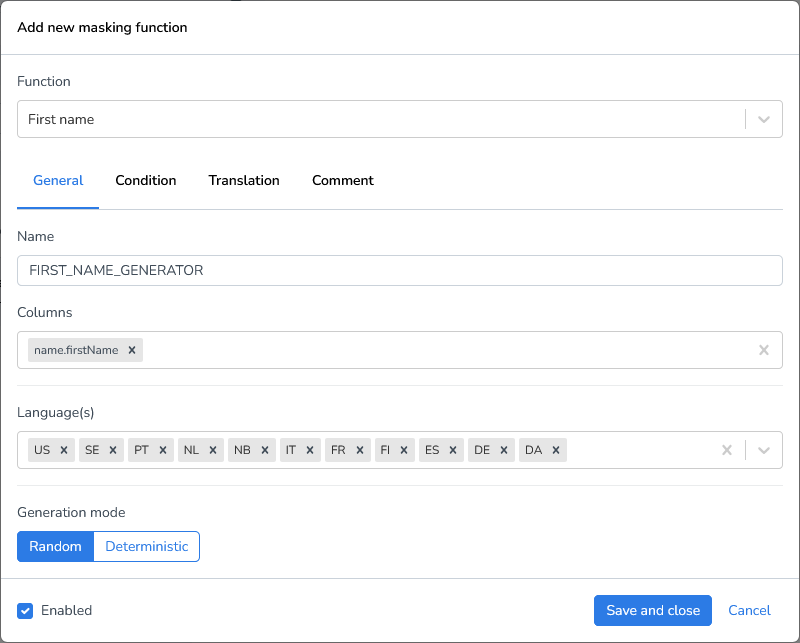
Select the function First name generator.
Enter the column(s) to be masked,
firstNamein our case. Because this is a nested column, you need to specify it as:name.firstName
Important note on attribute ordering:
When processing JSONL files, the order of attributes in each JSON object cannot be guaranteed. Attributes are written out alphabetically. While this does not affect how data reading software interprets the file, it may appear unusual when inspecting the file manually
Result:
{"birthInfo":{"country":{"code":"ES","name":"Spain"},"dateOfBirth":"1970-01-10","placeOfBirth":"Barcelona"},"contactInfo":{"email":{"address":"miguel.marie@example.com","type":"personal"},"phone":{"number":"+48-819-600-133","type":"mobile"}},"documents":{"passport":{"expiryDate":"2031-08-11","issueDate":"2010-01-27","issuedBy":"ES","number":"X89083863"}},"gender":"M","id":"P000001","name":{"firstName":"Adelphine","lastName":"Marie"}}
{"_comment":"Privacy-safe content generated for testing flows.","birthInfo":{"country":{"code":"UK","name":"United Kingdom"},"dateOfBirth":"1974-12-06","placeOfBirth":"Newcastle"},"contactInfo":{"email":{"address":"alfio.schellekens@mail.test","type":"personal"},"phone":{"number":"+61-511-615-594","type":"mobile"}},"documents":{"passport":{"expiryDate":"2032-01-19","issueDate":"2018-08-08","issuedBy":"UK","number":"X07816184"}},"gender":"M","id":"P000002","name":{"firstName":"Rókur","lastName":"Schellekens"}}
{"_comment":"Employment data may be incomplete.","birthInfo":{"country":{"code":"NL","name":"Netherlands"},"dateOfBirth":"1975-12-18","placeOfBirth":"Amsterdam"},"contactInfo":{"email":{"address":"adrian.hubert@mail.test","type":"personal"},"phone":{"number":"+353-164-752-553","type":"mobile"}},"documents":{"passport":{"expiryDate":"2028-01-11","issueDate":"2008-07-05","issuedBy":"NL","number":"X41928327"}},"gender":"M","id":"P000003","name":{"firstName":"Rodger","lastName":"Hubert"}}
{"birthInfo":{"country":{"code":"US","name":"United States"},"dateOfBirth":"1978-04-20","placeOfBirth":"Houston"},"contactInfo":{"email":{"address":"daniel.newman@sample.org","type":"personal"},"phone":{"number":"+31-395-376-724","type":"mobile"}},"documents":{"passport":{"expiryDate":"2029-01-22","issueDate":"2008-12-15","issuedBy":"US","number":"X23884969"}},"gender":"M","id":"P000004","name":{"firstName":"Louisa-Andreea","lastName":"Newman"}}
Conditional Masking
Sometimes you only want to mask fields under certain conditions. For this example we’ll change the first name generator to a male first name generator and only mask when the gender is male.
When specifying a condition in a masking rule or transformation, only include the conditional expression itself, do not include SQL keywords such as WHERE.
Notes
Conditions follow standard SQL comparison rules.
Field names must match the dataset schema.
String values must be enclosed in single quotes (
').Do not include trailing semicolons (
;).
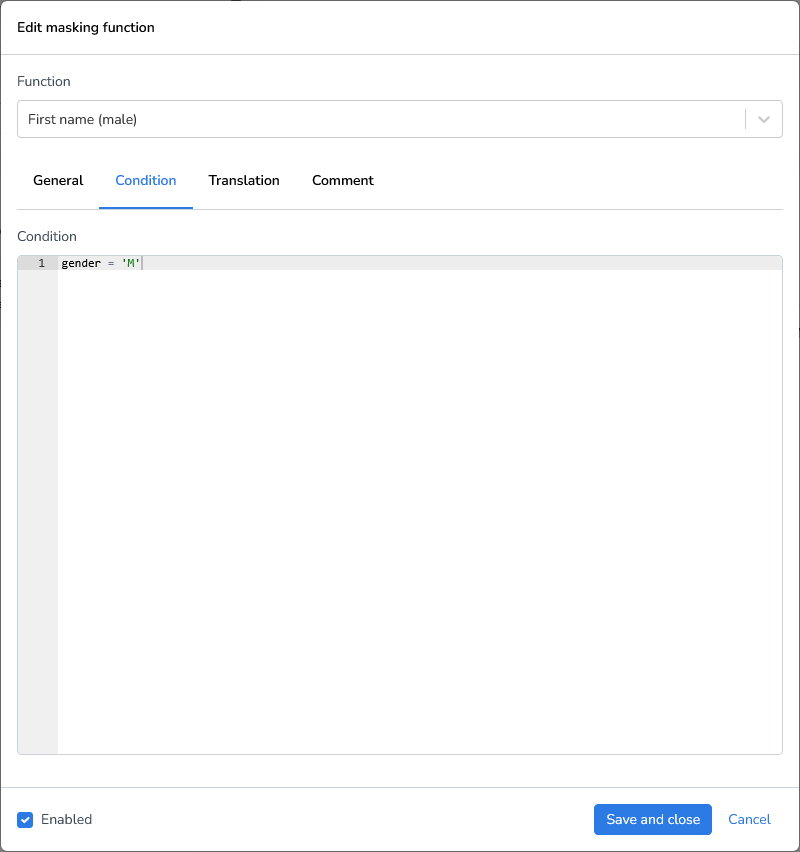
Running this masking function results in:
{"birthInfo":{"country":{"code":"ES","name":"Spain"},"dateOfBirth":"1970-01-10","placeOfBirth":"Barcelona"},"contactInfo":{"email":{"address":"miguel.marie@example.com","type":"personal"},"phone":{"number":"+48-819-600-133","type":"mobile"}},"documents":{"passport":{"expiryDate":"2031-08-11","issueDate":"2010-01-27","issuedBy":"ES","number":"X89083863"}},"gender":"M","id":"P000001","name":{"firstName":"Kedric","lastName":"Marie"}}
{"_comment":"Privacy-safe content generated for testing flows.","birthInfo":{"country":{"code":"UK","name":"United Kingdom"},"dateOfBirth":"1974-12-06","placeOfBirth":"Newcastle"},"contactInfo":{"email":{"address":"alfio.schellekens@mail.test","type":"personal"},"phone":{"number":"+61-511-615-594","type":"mobile"}},"documents":{"passport":{"expiryDate":"2032-01-19","issueDate":"2018-08-08","issuedBy":"UK","number":"X07816184"}},"gender":"M","id":"P000002","name":{"firstName":"Haybat","lastName":"Schellekens"}}
{"_comment":"Employment data may be incomplete.","birthInfo":{"country":{"code":"NL","name":"Netherlands"},"dateOfBirth":"1975-12-18","placeOfBirth":"Amsterdam"},"contactInfo":{"email":{"address":"adrian.hubert@mail.test","type":"personal"},"phone":{"number":"+353-164-752-553","type":"mobile"}},"documents":{"passport":{"expiryDate":"2028-01-11","issueDate":"2008-07-05","issuedBy":"NL","number":"X41928327"}},"gender":"M","id":"P000003","name":{"firstName":"Harikrishnan","lastName":"Hubert"}}
{"birthInfo":{"country":{"code":"US","name":"United States"},"dateOfBirth":"1978-04-20","placeOfBirth":"Houston"},"contactInfo":{"email":{"address":"daniel.newman@sample.org","type":"personal"},"phone":{"number":"+31-395-376-724","type":"mobile"}},"documents":{"passport":{"expiryDate":"2029-01-22","issueDate":"2008-12-15","issuedBy":"US","number":"X23884969"}},"gender":"M","id":"P000004","name":{"firstName":"Roald-Ian","lastName":"Newman"}}
{"_comment":"Imported test entry for masking workflows.","birthInfo":{"country":{"code":"IT","name":"Italy"},"dateOfBirth":"1959-11-02","placeOfBirth":"Milan"},"contactInfo":{"email":{"address":"megan.norman@mail.test","type":"personal"},"phone":{"number":"+61-691-669-784","type":"mobile"}},"documents":{"passport":{"expiryDate":"2026-10-10","issueDate":"2009-10-01","issuedBy":"IT","number":"X80184514"}},"gender":"F","id":"P000005","name":{"firstName":"Megan","lastName":"Norman"}}
When JSON Lines (.jsonl) files are processed by Runtime, the order of attributes inside each JSON object is not preserved. The serialization process writes fields alphabetically by attribute name.
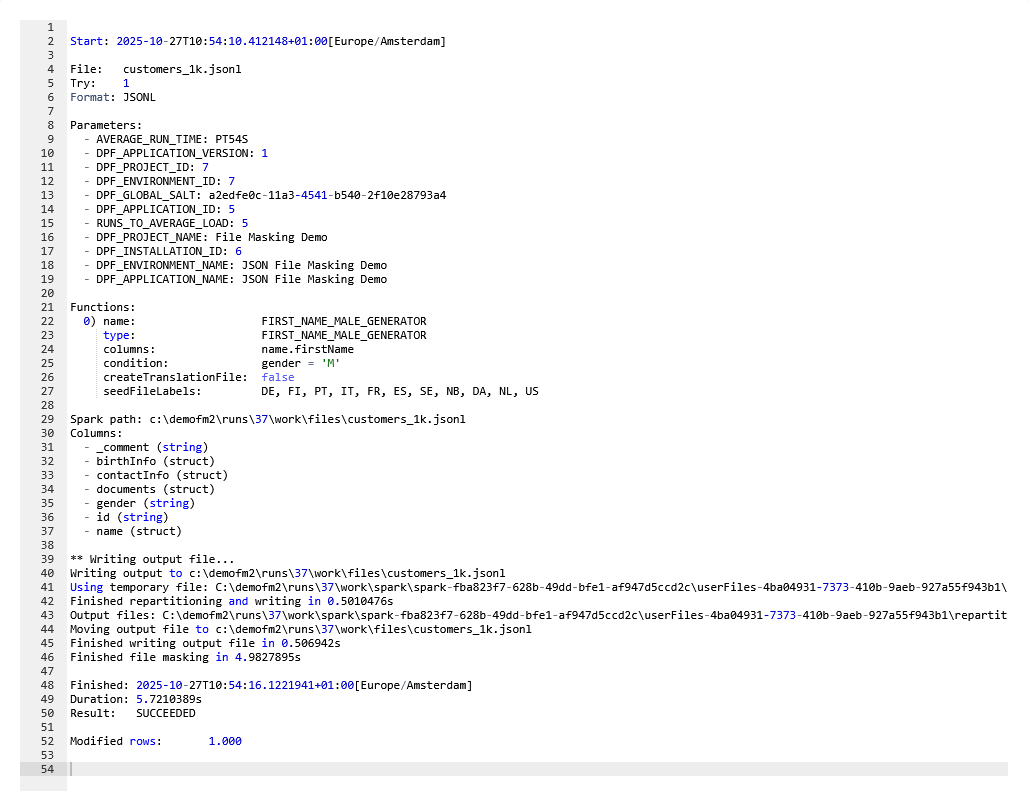
When filtering or masking is applied (e.g., gender = 'M'), only matching records are modified, for example, about half of the dataset.
However, because the software rewrites each processed row with alphabetical attribute ordering, the masking function will report:
Modified rows: 1.000This is expected behavior and does not mean all records were logically changed, only their formatting order changed.
Custom Expressions
The 'Custom Expression' is a flexible function that allows you to use any database platform function to manipulate data in the selected column. In this demonstration, we'll use the newly masked first names and last names to generate a corresponding email address.
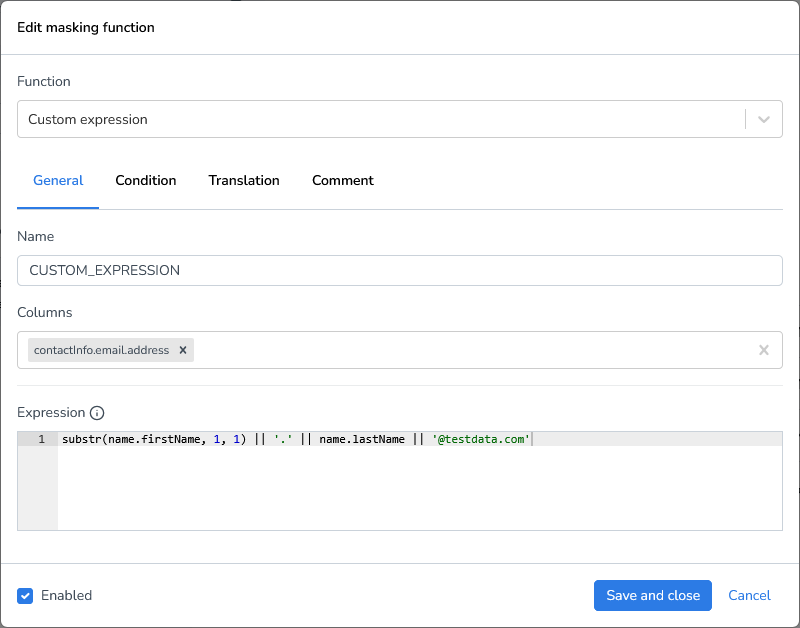
Result:
{"birthInfo":{"country":{"code":"ES","name":"Spain"},"dateOfBirth":"1970-01-10","placeOfBirth":"Barcelona"},"contactInfo":{"email":{"address":"K.Marie@testdata.com","type":"personal"},"phone":{"number":"+48-819-600-133","type":"mobile"}},"documents":{"passport":{"expiryDate":"2031-08-11","issueDate":"2010-01-27","issuedBy":"ES","number":"X89083863"}},"gender":"M","id":"P000001","name":{"firstName":"Kedric","lastName":"Marie"}}
{"_comment":"Privacy-safe content generated for testing flows.","birthInfo":{"country":{"code":"UK","name":"United Kingdom"},"dateOfBirth":"1974-12-06","placeOfBirth":"Newcastle"},"contactInfo":{"email":{"address":"H.Schellekens@testdata.com","type":"personal"},"phone":{"number":"+61-511-615-594","type":"mobile"}},"documents":{"passport":{"expiryDate":"2032-01-19","issueDate":"2018-08-08","issuedBy":"UK","number":"X07816184"}},"gender":"M","id":"P000002","name":{"firstName":"Haybat","lastName":"Schellekens"}}
{"_comment":"Employment data may be incomplete.","birthInfo":{"country":{"code":"NL","name":"Netherlands"},"dateOfBirth":"1975-12-18","placeOfBirth":"Amsterdam"},"contactInfo":{"email":{"address":"H.Hubert@testdata.com","type":"personal"},"phone":{"number":"+353-164-752-553","type":"mobile"}},"documents":{"passport":{"expiryDate":"2028-01-11","issueDate":"2008-07-05","issuedBy":"NL","number":"X41928327"}},"gender":"M","id":"P000003","name":{"firstName":"Harikrishnan","lastName":"Hubert"}}
{"birthInfo":{"country":{"code":"US","name":"United States"},"dateOfBirth":"1978-04-20","placeOfBirth":"Houston"},"contactInfo":{"email":{"address":"R.Newman@testdata.com","type":"personal"},"phone":{"number":"+31-395-376-724","type":"mobile"}},"documents":{"passport":{"expiryDate":"2029-01-22","issueDate":"2008-12-15","issuedBy":"US","number":"X23884969"}},"gender":"M","id":"P000004","name":{"firstName":"Roald-Ian","lastName":"Newman"}}
Dependencies
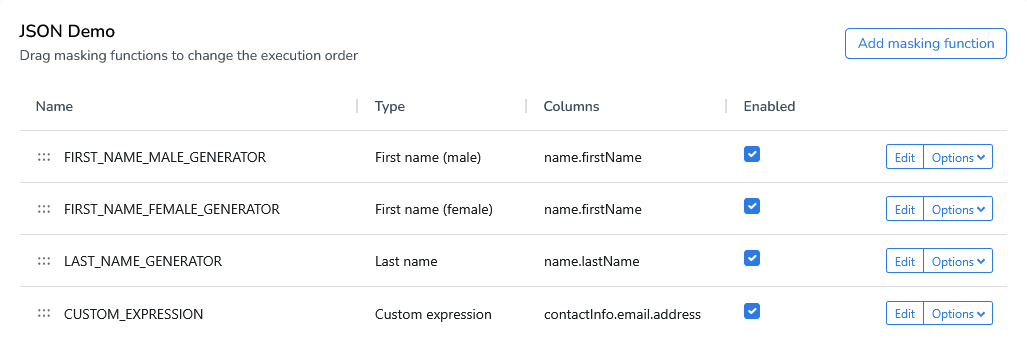
Unlike Privacy or Subset, Runtime does not have a dependency editor. Runtime executes functions sequentially from top to bottom. You can reorder functions by dragging them up or down using the drag indicator.
Value Lookup
To replace values with predefined translations, you can use a lookup file. Lookup files allow you to map original values to their corresponding replacements without hardcoding the translations directly in your masking logic. This approach is particularly useful when you need to maintain consistent mappings across multiple columns or projects.
Lookup files support three common data formats:
CSV (Comma-Separated Values): A simple, widely-supported format ideal for straightforward key-value mappings
Parquet: A columnar storage format optimized for performance with large datasets
JSONL (JSON Lines): A flexible format where each line contains a separate JSON object, useful for complex or nested data structures
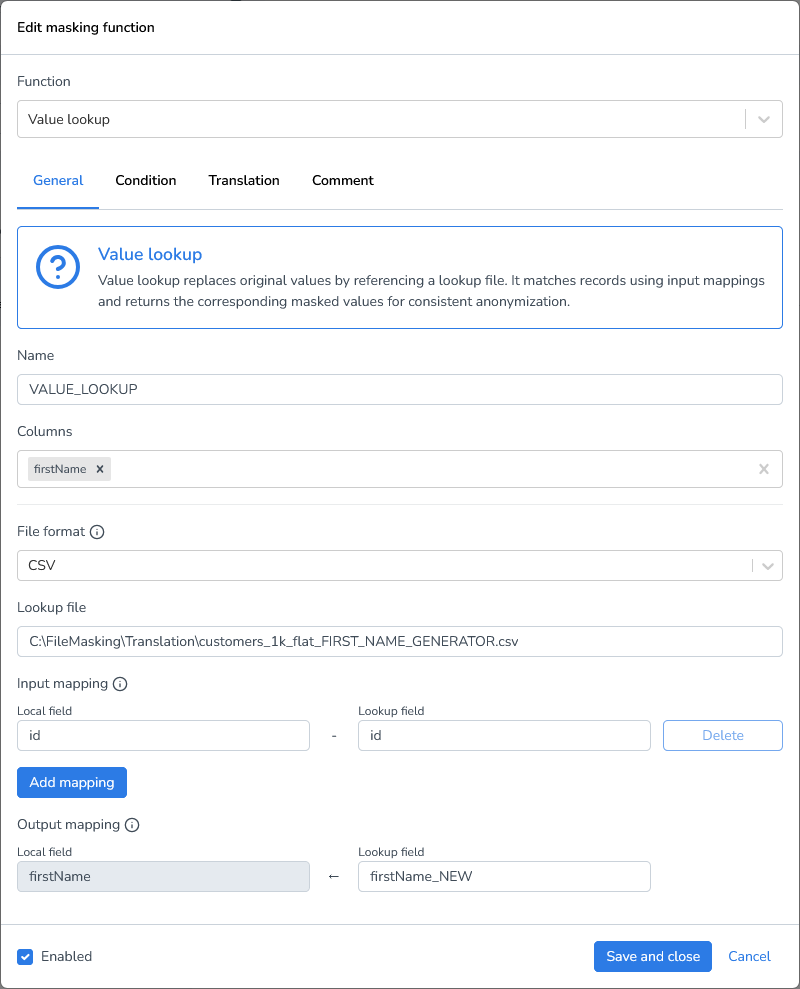
To create a lookup file, you can either configure it yourself or create a translation file once and use that file in subsequent runs. I’ve already created a lookup file for the firstName column and will use that file to mask another jsonl file.
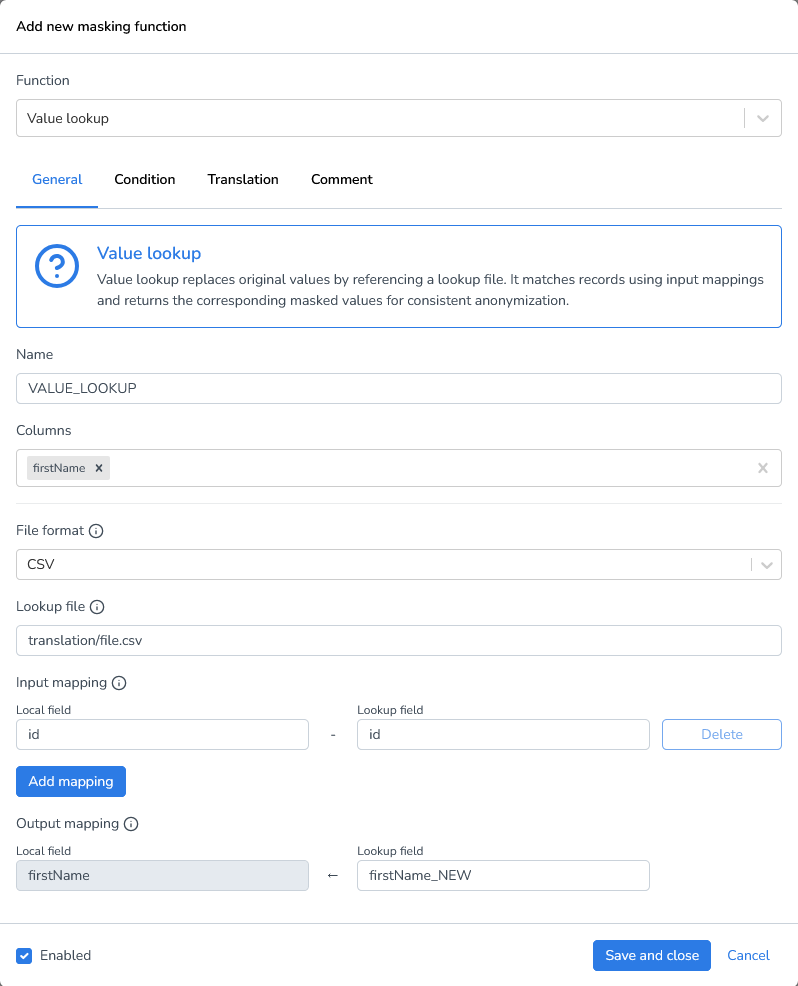
Add a new masking function “Value Lookup”
Columns: Enter the column name
File format: Select the file format of the lookup file (CSV, Parquet, or JSONL)
Lookup file : Use a full path to specify a local lookup file. Use a relative path to specify a file in the target environment.
Input mapping: Specify which field in your lookup file should be matched against your source column values. In this demo, we're matching against the
idfieldOutput mapping: Specify which field in your lookup file contains the replacement values that will be used in the transformation
Local/Network files: use full (absolute) file paths to ensure the system can correctly locate the file, regardless of the current working directory.
Example:C:\Data\Exports\file.csv\\Server\Shared\Backups\file.csv
Azure/AWS: Use relative paths within the configured storage container, bucket, or root directory. The base location is defined in the cloud storage configuration, so only the path relative to that root is required.
Example:translation/file.csvbackups/2026/file.csv
Local/Network files use full path